







Earn €500 when a friend you refer enrols, and help them kickstart their future.

Join affiliate programme
Log inApply now
Self-paced online programme

Building with AI Agents online course

Aim to become 5–10× more effective in your role. Build in-demand AI skills to automate complex work, launch your own tools and increase your earning potential. Learn to lead AI agents at your own pace, with personal mentor feedback. No coding experience needed.

Building with AI Agents

Next group starts

September 21st

Who it's forNon-technical professionals
Duration3.5-4.5 months · 12h/week
FormatOnline, in English
Learning modelReal projects, 1:1 mentor reviews
Course Report: Best Online Bootcamp 2026

88%*

of graduates get hired 6+ months after graduation

*Germany, as of July 2026. Includes learners whose program ended at least six months earlier and whose employment status could be confirmed. Unconfirmed outcomes were excluded.

Become an AI power user

Aim for 5–10× more output with AI.

Learn to set up agents that run workflows, test ideas and flag decisions for you. Choose your role to see what you could build.

Task
No AI

Marketer

You brief specialists, wait for their availability and coordinate the handoffs.

Advanced AI skills

AI Marketer

Build and run the workflow yourself with AI agents. You set the goal and approve.

How the work gets done

  1. You
  2. Analyst
  3. Creative
  4. Media buyer
  5. CRO
  6. Live
  1. You + AI agents
  2. Live

Campaign dashboard

A weekly export stitched together in a spreadsheet

Depends on: Analyst

Agents monitor spend, leads and revenue, flag shifts and suggest your next move.

Built & run by: You + AI agents

Ad creative variants

A brief, a review round and a queue for new variants

Depends on: Creative team

Agents create variants and check them against your brand rules. You approve the shortlist.

Built & run by: You + AI agents

Landing page test

Mockup, ticket, build, QA, then wait for a release window

Depends on: CRO + developer

Set up agents to run A/B tests and analyse results. You choose what to roll out.

Built & run by: You + AI agents

No AI

Marketer

You brief specialists, wait for their availability and coordinate the handoffs.

How the work gets done

  1. You
  2. Analyst
  3. Creative
  4. Media buyer
  5. CRO
  6. Live
  • Campaign dashboard

    A weekly export stitched together in a spreadsheet

    Depends on: Analyst

  • Ad creative variants

    A brief, a review round and a queue for new variants

    Depends on: Creative team

  • Landing page test

    Mockup, ticket, build, QA, then wait for a release window

    Depends on: CRO + developer

Advanced AI skills

AI Marketer

Build and run the workflow yourself with AI agents. You set the goal and approve.

How the work gets done

  1. You + AI agents
  2. Live
  • Campaign dashboard

    Agents monitor spend, leads and revenue, flag shifts and suggest your next move.

    Built & run by: You + AI agents

  • Ad creative variants

    Agents create variants and check them against your brand rules. You approve the shortlist.

    Built & run by: You + AI agents

  • Landing page test

    Set up agents to run A/B tests and analyse results. You choose what to roll out.

    Built & run by: You + AI agents

5–10× is an ambition for repeatable tasks, not a measured course result. Your gains depend on the workflow and how you use AI.

Not sure which course to take?

Compare our programs
AI Benchmark Quiz

Where do your AI mastery skills land?

Check where you stand against the Building with AI programme's skills. See your gaps and build towards Black belt by completing the programme.

6–7 questions + 2 skills check-ins · about 3 minutes · email required

Example result · not your score

AI Marketer track

Yellow belt

4/15

programme skills checked

Building with AI · Programme skill ladder

  1. Black beltProgramme completion level
    15
  2. Purple belt
    10–14
  3. Green belt
    7–9
  4. Yellow belt
    3–6
    Example
  5. White belt
    0–2

4/15 skills checked

+3 skills → Green belt

What can you expect?

Learn, build, get feedback. Repeat with a more ambitious project.

  • Projects that go live

    Follow a clear path from a simple web tool to an AI assistant and a final project based on your own idea.

  • One-to-one expert feedback

    Review your work with experienced professionals. Understand what AI produced and how to improve it.

  • Tools introduced step by step

    Learn Claude Code and supporting tools through projects, exactly when you need them. No coding experience required.
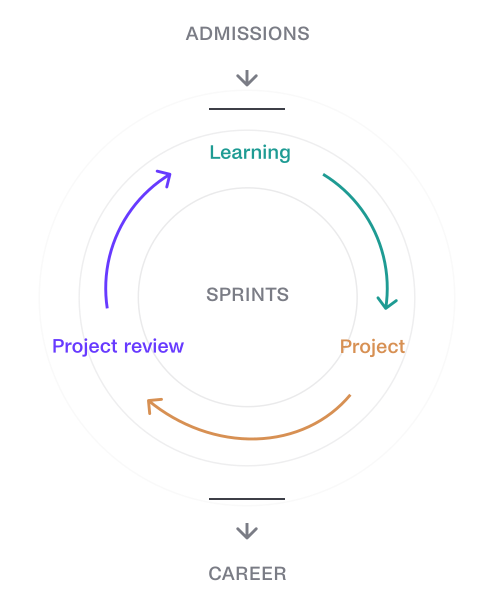
After admissions, repeat the learning, project and project-review cycle as you work towards your career goals.

What you’ll be able to do

Turn a business problem into a working tool
Learn to give AI coding agents clear goals, useful context and repeatable instructions. Use specifications, agent memory and custom skills to guide their work.
Build and launch dashboards, internal tools and websites
Create complete tools using Next.js, Supabase and Vercel. Add databases, user accounts and connections to external services.
Guide AI agents towards more reliable results
Coordinate AI agents, connect them to tools through MCP and use automated browser tests to check whether the finished product behaves as expected.
Take a prototype to a live product
Add custom domains, logins, payments, testing and automated deployment so you can take what you build beyond an initial prototype.
Building with AI case study

From construction expertise to an AI product.

After 20 years in construction, Rimvydas Samulionis is building Ceiling Advisor through Building with AI: an assistant that helps architects and customers find answers in technical product documents, with sources they can check.

Rimvydas Samulionis
My role is to understand what needs to be built, make good decisions and make sure all the parts work together.
Rimvydas Samulionis
Project Manager at MONTEM · Building with AI learner
Read Rimvydas's full story

Optional: Watch the Doku build

For another example, watch Lukas build Doku, Turing College's internal knowledge tool. Lukas had prior technical experience; this walkthrough shows his process.

What you'll build, sprint by sprint

Five sprints, each ending with a project deployed online. Self-paced: most learners finish in 3.5-4.5 months at around 12 hours a week.

01Your first app, live on the web

Set up Claude Code, Git and GitHub, learn to brief an AI coding agent with the right project context and build your first Next.js web application. Sprint project: a document-management app deployed at a link you can share.

A document-management app onlineBriefing an AI coding agentVersion control with Git and GitHub

Tools you'll meet: Claude Code, Git, GitHub, Next.js.

02An app your team can log into

Add a Supabase database and user authentication, set access rules for colleagues, package repeat work into your own Claude Code skills and debug with the agent. Sprint project: a full-stack application with live data, hosted on Vercel.

User authenticationA live Supabase databaseTeam access rulesReusable Claude Code skills

Tools you'll meet: Claude Code skills, Supabase, Vercel.

03An AI assistant that knows your context

Connect your application to AI models through OpenRouter, give agents access to other services through MCP, coordinate subagents and test behaviour with Playwright. Sprint project: an AI personal assistant that remembers context and uses connected tools.

An AI assistant with memoryAgents that use external toolsAutomated browser tests

Tools you'll meet: OpenRouter, MCP, Agent teams, Playwright.

04A product with mobile access and payments

Learn the security, compliance and data-access rules a production application has to meet. Build a mobile app with Expo, connect external APIs and add Stripe payments. Sprint project: a SaaS product with subscriptions and an admin dashboard.

Security and compliance basicsA mobile appStripe payments and subscriptionsAn admin dashboard

Tools you'll meet: Expo, Stripe, External APIs.

05Your own idea, built and launched

Plan, build, test and deploy an AI-powered application of your own design, ideally the tool your team has been waiting for. Present it in a live demo and leave with a product you can keep developing after the course.

Your own working productA live demoA portfolio piece for your CV

Tools you'll meet: Claude Code, Supabase, OpenRouter, Stripe, Vercel.

The tools you'll learn to direct

You meet each one inside a project, with a plain-English explanation of what it does and when you need it. No prior knowledge assumed.

Claude CodeThe AI agent that builds
CursorAn editor with AI built in
GitHubWhere your work is saved
SupabaseWhere your app's data lives
FirebaseBehind-the-scenes for mobile apps
StripeTaking payments
OpenAI APIAdding AI to your tools
LangChainAI that reads your documents
FigmaSketching how it looks
LovableAI that designs screens
ExpoBuilding mobile apps
Google CloudLogins and services

Meet the people who built the programme

The programme is built and kept current by people who direct AI coding agents every day, develop AI products and lead software teams. They review it as the tools change, so what you learn is how it is actually done now.

Lukas Kaminskis

Lukas Kaminskis

Course creator

Co-founder & CEO of Turing College, backed by Y Combinator

Jaunius Pinelis

Jaunius Pinelis

Course creator

Built enterprise GenAI platforms at Danske Bank

Giedrius Žebrauskas

Giedrius Žebrauskas

Course creator

Led multinational dev teams at Western Union

Fet Özyürek

Fet Özyürek

Course creator

Leads modern AI and data programs at Turing College

Professionals like you, building for their own jobs

The content is clear, relevant, and links theory to real workplace scenarios. I've been able to apply what I'm learning straight away to work more efficiently, plan tasks better, and communicate more clearly with stakeholders.
I've built a stronger understanding of how AI fits into our processes. I've used what I've learned to speed up data tasks, improve reports, and spot opportunities where AI can save time for myself and other staff members.
I've learnt to use prompts in a more efficient and effective way. Recently, I used AI to identify gaps in our processes and produce clear meeting outcomes for the wider team. It was much faster than typing up notes and gave us a clear way forward.
The tutor meetings and workshops provide a great opportunity to discuss the learning. I've already used the prompt engineering and productivity tips to run my own training sessions for my colleagues, helping them use AI more effectively in their own work.

Find the right Turing College AI course for you

Start with your goal. Compare experience, study time and what you will build.

3 programs, side by sideSwipe to compare

Compare AI courses
At a glance
Build products & automate

Building with AI Agents

Automate & analyse

AI for Business

Engineer AI

AI Engineering

Coding experience
No coding required

Direct AI coding agents like Claude Code instead of writing code yourself.

No coding required
1+ year of coding

Experience in Python or JavaScript.

Best for

Build and ship software

Consultants, sales, marketing, finance, product, UX/UI and operations professionals, plus founders and early-stage teams.

Use AI confidently at work

Marketing, finance and operations professionals who want practical AI skills without a technical focus.

Specialise in AI development

Developers ready to build LLM applications and AI agents.

Study plan

Self-paid · flexible

Duration
3.5–4.5months
Per week
12hours

Self-paid · flexible

Duration
2–4months
Per week
9hours

Self-paid · flexible

Duration
3–4months
Per week
10hours
What you'll build
  • A live dashboard, internal tool or web app
  • Solve a real problem at work
  • Your own capstone, deployed and ready to use
  • Clean and explore data in spreadsheets or SQL
  • A/B tests and KPI calculations
  • No-code automations with tools like Zapier
  • Build LLM applications, RAG systems and AI agents
  • Evaluate and deploy your solutions
  • Design and deliver an end-to-end AI capstone project
Key tools
  • Claude Code
  • Next.js
  • Supabase
  • Vercel
  • MCP
  • ChatGPT
  • Gemini
  • Claude
  • n8n
  • Zapier
  • Python with AI
  • LangChain
  • LangGraph
  • RAG
  • ChromaDB
  • MCP

Durations shown are flexible tracks; ask admissions about funded options.

How admissions works

Two simple steps, designed to help you and our team understand whether the programme is the right next step for you, and what you would build first.

  1. 1

    Application

    Tell us about your goals and the tool you want to build. Our admissions team reviews your application personally.
  2. 2

    Consultation

    Meet us for 20–30 minutes to discuss your project, schedule and funding. Bring your benchmark result as a starting point.

Basic admission requirements:

No coding background

None needed. You direct an AI coding agent in plain English; the programme explains technical ideas only when a project needs them.

Time commitment

Plan for around 12 hours per week. The programme is self-paced, and most learners finish in 3.5-4.5 months.

English proficiency

Materials, mentor sessions and project reviews are in English, and English is how you brief your AI agent. Reading comfort matters most; many learners speak English as a second language.

A computer and stable internet

Any modern laptop works. Nothing to install that we don't walk you through, and no special hardware.

Flexible payment and funding options

You’re resident of:

Education voucher (Bildungsgutschein)

Best for

German residents eligible for a Bildungsgutschein

Course duration

Fixed, 3 months

Time commitment

30 h per week

Price

€0Fully funded

With a Bildungsgutschein

Claude Max (5x) included

Upfront payment

Best for

Learners who want the lowest total price by paying upfront

Course duration

Flexible, 3.5-4.5 months

Time commitment

12 h per week

Price

€2,000Inauguration scholarship

Regular price €3,500

14-day money-back guarantee

Installments

Best for

Learners who prefer to split self-payment into monthly installments

Course duration

Flexible, 3.5-4.5 months

Time commitment

12 h per week

Price

€625x 4 monthsInauguration scholarship

Regular price €990 x 4 months

14-day money-back guarantee

Choose your next group. Apply now!

Starting dates

September 21st

Limited seats

Self-paced, start with the October group

FAQ

What is Building with AI Agents?

Building with AI Agents is a beginner-level course for professionals who want to solve a real problem at work using AI. You direct AI to write the code in plain English, while you handle the planning, the context, and the final review. What you build can be as small as a dashboard that keeps itself up to date, or as ambitious as a full working product, like the internal tool our CEO built to replace a paid software subscription entirely by directing AI agents. Across five sprints, you'll build things like an internal tool, a dashboard, and an AI assistant, ending with a capstone project of your own choosing. No prior coding experience is required.

What is agentic coding, and what does an AI coding agent do?

Agentic coding is a way of building software by giving an AI agent a goal and allowing it to complete a sequence of development tasks. Depending on the access you provide, an AI coding agent can inspect project files, write and edit code, run commands, test an application and respond to errors. You remain responsible for the goal, context, permissions and final review.

Why agentic coding is becoming a practical way to build

You decide what to build. The agent helps execute it.

AI coding agents can inspect a project, change files, run commands and tests, and work through a sequence of development tasks. The person directing the agent still makes the product decisions, supplies context and checks whether the result works as intended.

In June 2026, Anthropic published research based on roughly 400,000 Claude Code sessions recorded between October 2025 and April 2026. In a typical session, people made most of the planning decisions while Claude made most of the execution decisions. The research also found that people across major occupations completed coding tasks at close to the average success rate of software engineers, while relevant domain expertise improved the likelihood of success.

The 2025 DORA State of AI-assisted Software Development report reached a related conclusion for software teams: AI tends to amplify the strengths and weaknesses of the system around it. Better results depend on clear workflows, sound development practices and appropriate technical safeguards, not access to an AI tool alone.

This course teaches the workflow around the agent. You will learn how to plan, provide context, test, debug, review and deploy, so a quick prototype can become software you can explain and improve.

Do I need coding experience, and is this a no-code course?

No prior coding experience is required. The course is built around Claude Code, the main AI coding agent you'll use throughout. If you already use or prefer a different agent, such as Codex, you can complete most of the course with it too.

You'll work with real, working code and real developer tools, not a closed drag-and-drop platform. The AI handles most of the actual coding, while you direct the work and check the results.

The course introduces technical concepts only when you need them. You should be comfortable learning new tools, checking results, and troubleshooting when something doesn't work as expected.

What will I build during the course?

You'll build a working internal tool, an application with a live database and logins, an AI personal assistant, a mobile app, a subscription product with payments, and a capstone project of your own choosing. Past examples include Rimvydas, a project manager with 20 years in construction and no coding background, who built a tool that checks his company's product documentation for him instead of doing it by hand, and our CEO Lukas, who had prior technical experience and rebuilt an internal Notion alternative in around 30 hours.

How is Building with AI Agents different from vibe coding?

Vibe coding usually means prompting an AI tool until a prototype appears to work. Building with AI Agents teaches a structured process for defining requirements, managing context, reviewing changes, testing behaviour, protecting data and deploying software. You still direct the agent, but you also learn how to check and improve what it produces.

Can I build a production application without being a developer?

AI coding agents can complete many implementation tasks, but a working prototype is only part of a production application. You also need to define requirements, manage access, test behaviour, protect data, check security and maintain the product. The course teaches these parts of the process and gives you feedback while you practise them.

How many hours a week does the course require, and can I study while working full-time?

That depends on how you're funding it. If you're paying for the course yourself, it's 12 hours a week, over 3.5 to 4.5 months, designed to fit around full-time work. If you're studying through the Germany-funded Bildungsgutschein route, it's 30 hours a week of study time, over 3 months, treated as full-time and not compatible with a full-time job.

You might also see "40 academic hours" mentioned for the Germany-funded route. That's the same 30 hours, just measured in 45-minute academic-hour units rather than 60-minute clock hours, which is how German funding paperwork counts study time. Same commitment, different unit.

Can a Bildungsgutschein cover this course?

Eligible German residents can study the approved three-month programme with a Bildungsgutschein, which covers the tuition cost. The Agentur für Arbeit decides eligibility after an individual consultation, so German residence alone does not guarantee funding.

What certificate will I receive?

You will receive one Turing College certificate for Building with AI Agents after completing the required core programme. The global certificate records 200 hours. The Germany-funded certificate records 520 hours. The certificate lists the programme parts you have completed when it is issued. The global capstone is not required for the core certificate.

What happens if I get stuck?

You can attend weekly stand-ups, join Open Sessions shared with AI Engineering learners, and get one-to-one project reviews with experienced professionals to troubleshoot problems and receive feedback on decisions.

Is the Turing College Building with AI Agents programme right for you?

We would rather you choose the right programme than enrol in the wrong one.

This programme is for you if:

  • ✅ You want to learn how to turn ideas, products or manual processes into working software.
  • ✅ You want to build full-stack web applications, mobile apps, AI assistants or SaaS products by directing AI coding agents.
  • ✅ You do not have a coding background, but you are comfortable learning digital tools, checking results and solving problems when an application does not work as expected.
  • ✅ You want a repeatable process for planning, building, testing and deploying software, rather than relying on trial-and-error prompting.
  • ✅ You can commit around 12 focused hours per week for 3.5 to 4.5 months.
  • ✅ You live in Germany and can study for 40 academic hours per week over 13 weeks through an approved funded route.

This programme is not for you if:

  • ❌ You mainly want to use AI for analysis, content and workplace automation without building software. AI for Business is a better fit.
  • ❌ You already have at least one year of Python or JavaScript experience and want to specialise in LangChain, RAG and multi-agent systems. AI Engineering goes deeper into building LLM applications in code.
  • ❌ You want to train machine-learning models or study statistics and model theory. Data Science and AI is designed for that path.
  • ❌ You want a passive, video-only course. This course requires you to build projects, meet deadlines and respond to feedback from Senior Team Leads.
  • ❌ You need a university-accredited degree. This is a professional course that awards a Turing College certificate.
  • ❌ You expect an AI agent to produce reliable software without human review. You will need to test its work, manage access and make the final decisions.

What is the difference between Building with AI Agents, AI Engineering and AI for Business?

The main difference is what you want to create and how much coding experience you already have. Building with AI Agents teaches you to direct coding agents to create software. AI Engineering teaches experienced programmers to build LLM applications in code. AI for Business focuses on using AI and automation.

Which Turing College AI programme to choose
Choose this programmeIf your main goal is
Building with AI AgentsDirect AI coding agents to build and deploy web, mobile and AI-powered applications without needing previous coding experience.
AI EngineeringUse existing Python or JavaScript skills to build LLM applications, RAG systems and multi-agent systems in code.
AI for BusinessUse AI for workplace analysis, communication, decision-making and automation without becoming a software builder.
Your job + AI!Your job + AI!Your job + AI!Your job + AI!Your job + AI!Your job + AI!
Next group starts on September 21st